티스토리 뷰
Thread join() 메서드란?
A 스레드를 생성한 B 스레드에서 A 스레드가 작업이 완료할 때까지 B 스레드가 대기(WAITING) 상태이며 A 스레드가 작업 완료하면 B 스레드는 실행 중(RUNNABLE) 상태로 되돌린다. 아래 예제를 통해 알아보았다.
join() 메서드 사용 X 예제
아래 예제는 main 스레드 내에 두 개의 스레드를 생성했으며 두 개의 스레드는 1부터 n개의 숫자의 합을 구하는 작업을 한다. 그 후 main 스레드에서 두 개의 스레드의 작업한 결과를 더하여 출력하였다.
Main.java
public class Main {

    public static void main(String[] args) throws InterruptedException {
        // 스레드 생성, 각 스레드에 부모 스레드인 main 스레드를 넘겼다.
        Calculate calculate1 = new Calculate(10, Thread.currentThread());
        Calculate calculate2 = new Calculate(10, Thread.currentThread());
        Thread calThread1 = new Thread(calculate1,"calThread1");
        Thread calThread2 = new Thread(calculate2,"calThread2");

        System.out.println("=======Thread calThread join() 메서드X=======");
        calThread1.start();
        calThread2.start();

        System.out.println("Thread calThread1 result: " + calculate1.getResult());
        System.out.println("Thread calThread2 result: " + calculate2.getResult());
        System.out.println("Thread calThread1 + calThread2 result: " + (calculate1.getResult()+calculate2.getResult()));

        Thread.sleep(2000);
        System.out.println("=======2초 대기 후 실행 결과 확인=======");
        System.out.println("Thread calThread1 result: " + calculate1.getResult());
        System.out.println("Thread calThread1 state: " + calThread1.getState());
        System.out.println("Thread calThread2 result: " + calculate2.getResult());
        System.out.println("Thread calThread2 state: " + calThread2.getState());
        System.out.println("Thread calThread1 + calThread2 result: " + (calculate1.getResult()+calculate2.getResult()));

    }

    static class Calculate implements Runnable {
        private int calNumber;
        private int result;
        private Thread parentThread;

        Calculate(int calNumber, Thread parentThread) {
            this.calNumber = calNumber;
            this.parentThread = parentThread;
        }

        @Override
        public void run() {
            System.out.println("작업 시작 쓰레드 이름: " + Thread.currentThread().getName());
            System.out.println("부모 쓰레드 상태: " + parentThread.getState());
            try {
                Thread.sleep(1000);
            } catch (InterruptedException e) {
                throw new RuntimeException(e);
            }
            for(int i=0; i <= this.calNumber; i++) {
                this.result += i;
            }
        }

        public int getResult() {
            return result;
        }
    }
}
Runnable을 구현한 Calculate 스레드의 생성자는 계산할 숫자와, 부모 스레드의 참조값으로 구현하였다. 부모 스레드의 참조값을 통해 부모 스레드의 상태 값을 확인할 수 있다.
실행 결과
=======Thread calThread join() 메서드X=======
작업 시작 쓰레드 이름: calThread2
작업 시작 쓰레드 이름: calThread1
부모 쓰레드 상태: RUNNABLE
부모 쓰레드 상태: RUNNABLE
Thread calThread1 result: 0
Thread calThread2 result: 0
Thread calThread1 + calThread2 result: 0
=======2초 대기 후 실행 결과 확인=======
Thread calThread1 result: 55
Thread calThread1 state: TERMINATED
Thread calThread2 result: 55
Thread calThread2 state: TERMINATED
Thread calThread1 + calThread2 result: 110
위의 실행 결과를 보면 calThread1,2 스레드의 모든 결과 값이 0이 나오는 것을 확인할 수 있다. 그리고 2초 대기 후 정상적으로 실행 결과를 확인할 수 있다. 그 이유는 main 스레드가 calThread1,2 스레드가 작업하는 도중에 main 스레드가 실행되었기 때문에 0이 나왔으며 2초 대기 후 calThread1,2 스레드는 작업 완료하였기 때문에 정상적으로 실행 결과를 확인할 수 있다. 아래 그림은 위의 스레드의 각각 흐름을 표현하였다.
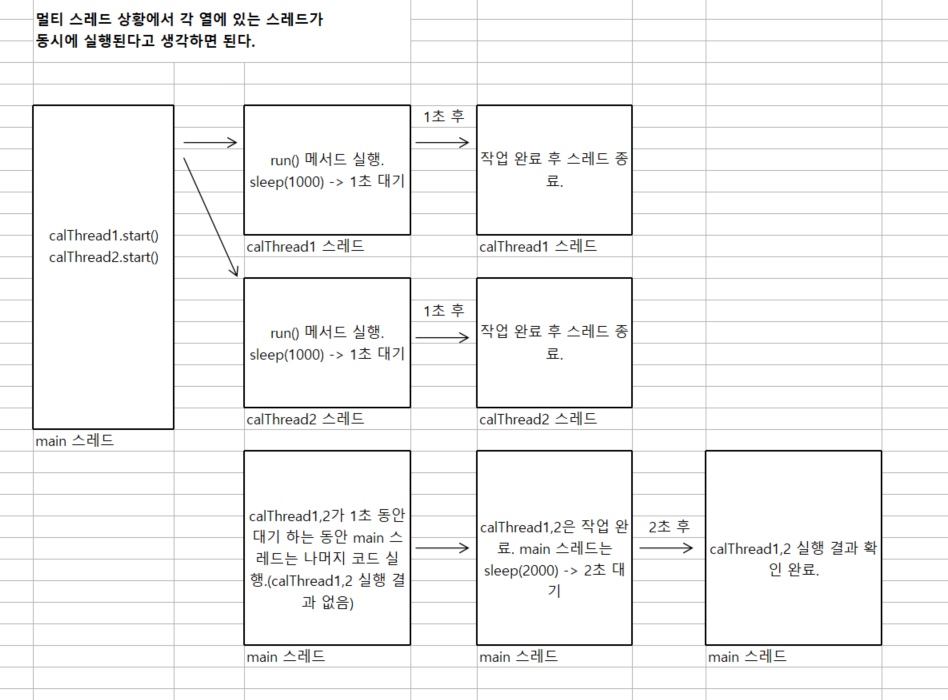
join() 메서드 사용X 문제점
위의 문제점은 calThread1,2가 작업을 실행하기 전에 main 스레드가 실행되어서 calThread1,2의 작업 결과를 확인할 수 없다는 것이다. 이를 해결하기 위해 join() 메서드를 사용하였다.
join() 메서드 사용O 예제
Main.java
public class Main {

    public static void main(String[] args) throws InterruptedException {
        // 스레드 생성, 각 스레드에 부모 스레드인 main 스레드를 넘겼다.
        Calculate calculate1 = new Calculate(10, Thread.currentThread());
        Calculate calculate2 = new Calculate(10, Thread.currentThread());
        Thread calThread1 = new Thread(calculate1,"calThread1");
        Thread calThread2 = new Thread(calculate2,"calThread2");

        System.out.println("=======Thread calThread join() 메서드O=======");
        calThread1.start();
        calThread1.join();
        calThread2.start();
        calThread2.join();

        System.out.println("=======calThread1, calThread2 작업 완료=======");
        System.out.println("부모 쓰레드 상태: " + Thread.currentThread().getState());
        System.out.println("Thread calThread1 state: " + calThread1.getState());
        System.out.println("Thread calThread1 result: " + calculate1.getResult());
        System.out.println("Thread calThread2 state: " + calThread2.getState());
        System.out.println("Thread calThread2 result: " + calculate2.getResult());
        System.out.println("Thread calThread1 + calThread2 result: " + (calculate1.getResult()+calculate2.getResult()));
    }

    // Calculate 스레드 생략
}
calThread1,2에 join() 메서드를 추가하였다. 이 메서드는 calThread1,2가 작업을 완료할 때까지 calThread1,2를 생성한(부모 스레드) main 스레드를 잠시 대기(WAITING) 상태로 바꾼다.
실행 결과
=======Thread calThread join() 메서드O=======
작업 시작 쓰레드 이름: calThread1
부모 쓰레드 상태: WAITING
작업 시작 쓰레드 이름: calThread2
부모 쓰레드 상태: WAITING
=======calThread1, calThread2 작업 완료=======
부모 쓰레드 상태: RUNNABLE
Thread calThread1 state: TERMINATED
Thread calThread1 result: 55
Thread calThread2 state: TERMINATED
Thread calThread2 result: 55
Thread calThread1 + calThread2 result: 110
위의 실행 결과를 보면 원하는 결과를 출력하였다. 그리고 join() 메서드를 통해 calThread1,2가 작업 중에는 부모 main 스레드는 WAITING 상태이고, calThread1,2가 작업을 완료한 후에는 부모 main 스레드가 RUNNABLE 상태로 바뀌었다.
특정 시간 만큼만 대기하려면?
join() 메서드 파라미터에 ms 값을 입력하면 그 시간만 WAITING 대기 후 RUNNABLE 상태가 된다. (작업 중에도 RUNNABLE 상태로 변경)
특정 시간 대기 join(ms) 메서드 예제
public class Main {

    public static void main(String[] args) throws InterruptedException {
        // 스레드 생성, 각 스레드에 부모 스레드인 main 스레드를 넘겼다.
        Calculate calculate1 = new Calculate(10, Thread.currentThread());
        Calculate calculate2 = new Calculate(10, Thread.currentThread());
        Thread calThread1 = new Thread(calculate1,"calThread1");
        Thread calThread2 = new Thread(calculate2,"calThread2");

        System.out.println("=======Thread calThread join(500) 메서드O=======");
        calThread1.start();
        calThread1.join(400);
        calThread2.start();
        calThread2.join(400);

        System.out.println("=======실행 결과 확인=======");
        System.out.println("부모 쓰레드 상태: " + Thread.currentThread().getState());
        System.out.println("Thread calThread1 state: " + calThread1.getState());
        System.out.println("Thread calThread1 result: " + calculate1.getResult());
        System.out.println("Thread calThread2 state: " + calThread2.getState());
        System.out.println("Thread calThread2 result: " + calculate2.getResult());
        System.out.println("Thread calThread1 + calThread2 result: " + (calculate1.getResult()+calculate2.getResult()));
    }

    // Calculate 스레드 생략
}
위의 코드에서 join() 메서드의 파라미터에 400ms를 입력하였으며 main 스레드는 calThread1,2가 각각 실행 중에 400ms 동안씩 대기하며 그 시간이 지나면 RUNNABLE 상태로 되돌린다.
실행 결과
=======Thread calThread join(400) 메서드O=======
작업 시작 쓰레드 이름: calThread1
부모 쓰레드 상태: TIMED_WAITING
작업 시작 쓰레드 이름: calThread2
부모 쓰레드 상태: TIMED_WAITING
=======실행 결과 확인=======
부모 쓰레드 상태: RUNNABLE
Thread calThread1 state: TIMED_WAITING
Thread calThread1 result: 0
Thread calThread2 state: TIMED_WAITING
Thread calThread2 result: 0
Thread calThread1 + calThread2 result: 0
실행 결과를 보면 calThread1,2 스레드가 TIMED_WAITING인 것을 확인할 수 있는데, 그 이유는 calThread1,2에 join(400)을 실행하였으며 calThread1,2는 각각 1초(1000ms) 동안 대기하는데 main 스레드는 400ms + 400ms 동안만 대기하기 때문에 800ms가 지나도 calThread1,2는 아직도 대기 중이다.
정리
멀티스레드 환경에서 생성한 스레드의 결과를 사용해야 하거나 확인이 필요할 경우 join() 메서드를 사용하여 작업 완료할 때까지 대기하여 생성한 스레드의 결과를 확인할 수 있으며, 메서드의 파라미터에 ms를 입력하여 파라미터의 시간만 대기하고 그 후 실행 상태로 변경할 수 있다.
본 포스팅은 “김영한의 실전 자바 - 고급 1편, 멀티스레드와 동시성/인프런”를 학습한 내용을 정리한 것
'Java > Java' 카테고리의 다른 글
| <Java> sychronized이란? (1) | 2024.10.22 |
|---|---|
| <Java> volatile이란? (0) | 2024.10.18 |
| <Java> 불변 객체가 필요한 이유? (2) | 2024.10.13 |
| <Java> 해시 자료 구조에서 equals(), hashCode() 메서드의 중요성 (0) | 2024.07.01 |
| <Java> 열거형(ENUM)이 생긴 이유? (0) | 2024.06.20 |